I was thinking to myself how much it would suck to have my phone stolen from me now. It’s so much more important than my wallet. I can survive a day without my wallet on me (barring some strange scenario where I have to present my identity card). But if I didn’t have my phone with me, I would have no excuse but to drive back home to pick it up.
Not having your phone today means not having cash, a way to contact people (or tweet), a GPS, and more. In fact, a few months ago you wouldn’t have been able to enter many places since you prove your vaccination/COVID status without the MySejahtera app.
Touch ’n Go’s eWallet is pretty rad. I enjoy not having to count bills or keeping coins in my pocket. Not all places accept it yet, but they’re becoming less common. If they don’t accept digital cash, I have my watch which can function as a credit card. Then there are online bank transfers as the last step before I resort to using cash. I admire how agile the country has been in terms of adopting digital trends.
Five years ago, I complained about the hassles of our parking system. I’m happy to say that this is no longer the case. It was a bit bumpy initially, with the various apps that we had to download for different areas, but it’s safe to say that paying for street parking is no longer a hassle. Thanks, Touch ’n Go!
I have no more qualms about parking my car anywhere I go these days. Since it’s become available I’ve paid for parking more than ever before. Even when there were occasions that I didn’t feel like paying – I did anyway. Better to be down RM1 than to receive a lucky ticket.
When you reduce the friction of a tedious procedure, it encourages people to utilize it more. At least that’s what I believe. It’s like how Steam conquered the gaming industry, Spotify for music, and Netflix for shows. They proved that when you make obtaining original content easier than piracy while being affordable at the same time, it shifts the scales.
It hasn’t eliminated piracy – people are still going to pirate for various reasons, but it’s better to make some money off ex-pirates than none of it. Media licensing is still a shit show. How long will it take for all these publishers to realize that geoblocking content in this day and age is such a backward practice? Sure, restrict physical goods since distribution and logistics are a pain in the ass to handle globally. But for digital goods? It makes no sense at all. Get with the times, guys.
I’m annoyed because Welcome Home Armageddon isn’t on Spotify Malaysia despite it having a listing. Why is the acoustic/remix EP (See You All In Hell) available but not the original? It’s times like these, piracy is justified. Also, I can’t believe I haven’t done a music post on Funeral for a Friend yet. A lot of bands get the same treatment on Spotify, especially the Japanese ones (still waiting for chickenrace).
I’m glad Elden Ring wasn’t geoblocked (finished it, by the way, game of the year 2022). Dance Gavin Dance has a new album coming out this year (RIP Tim Feerick), I’m sure it’s going to be a banger as well. What a great year 2022 is going to be.
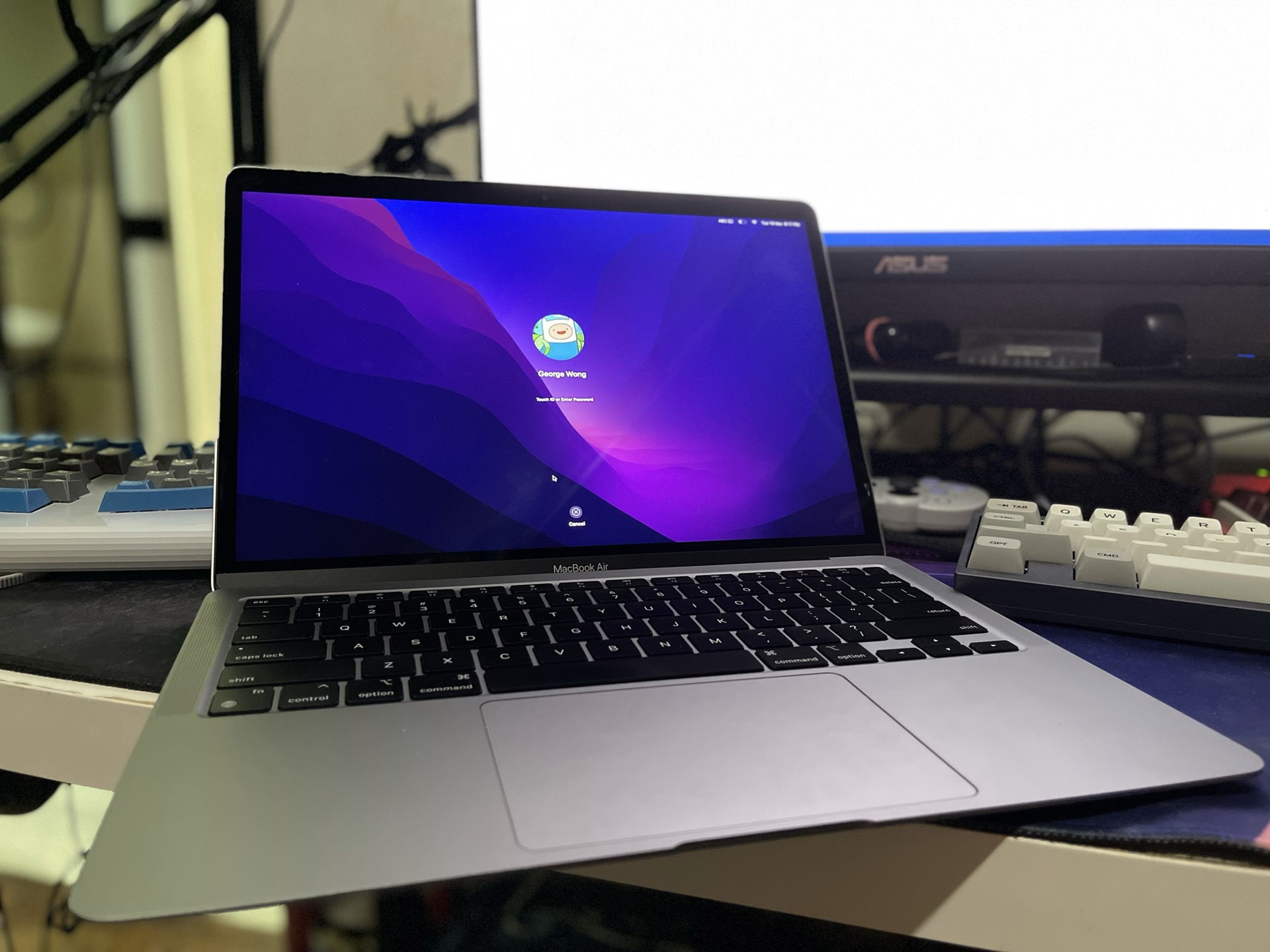
For over a week, I’ve been using a newly purchased MacBook Air (2020) as my daily driver for work. I bought a new laptop after giving my previous one, an ASUS Zenbook, to my sister since her current/old one was dying.
When I was shopping for a new laptop, I had a few requirements in mind. It had to be powerful enough for my work (because laggy computers are bad), lightweight (I intended to bring it everywhere), have good battery life (nobody likes lugging around chargers or being limited when deciding where to sit), and be something I could, of course, afford.
The MacBook Air ticked all the boxes. And this was before I had any first-hand experience using the machine. Reading up the specs and watching tonsofvideos about the laptop gave me all the information I needed to make my decision – it wasn’t something I took lightly. I spent a long time ruminating about the purchase because I had the time to do so (I had no opportunity to work outside due to the lockdown).
So what were my qualms about the MacBook Air? Initially, it was the new Apple Silicon. I had been exclusively using Intel processors when it came to laptops and desktops (minus the one time I had a prebuilt desktop with an AMD processor), so I was skeptical about how well an ARM-based processor could run a fully-featured desktop operating system.
Speaking of the operating system, how would I handle the transition? I had been using Windows for the better part of my life and the idea of having to switch to something else seemed daunting. Would I have access to all apps and programs that I needed?
Battery life for laptops is one of my biggest gripes. I’ve been let down way too many times by how poorly Windows laptops perform in this area. Many high-end devices I’ve tried out in the past have let me down. Even when I was still using the Zenbook, which had great battery life in the beginning, I didn’t feel safe leaving home without bringing my charger along.
Google and YouTube were my best friends during this period, and I looked up everything I wanted to know. Nothing swayed my opinion when it came to the laptop’s hardware – all the reviews said that the machine was a beast with killer battery life. As for the software, I wasn’t too concerned – if I could do my work on Linux/Android, I could survive on Mac OS.
With all that in mind, I chose the base model MacBook Air and upgraded the RAM and storage (16GB/512GB). I could have gotten by without the extra storage since I don’t plan to store large files on my laptop and always have thumb drives with me but I felt I could afford the additional peace of mind. As for the RAM upgrade, I’m glad I got it since Activity Monitor tells me I’m constantly using over 12GB (Photoshop, Chrome, and MS Teams are real resource hogs). If you use similar apps often, you’ll probably want the RAM upgrade if you don’t want your SSD being used constantly for memory swaps.
My Thoughts
I’m still getting used to Mac shortcuts. It’s annoying when programs like Chrome have different hotkeys for Windows/Mac, so I spent a lot of time learning new ones to get back up to speed. I’m still clicking a bunch of stuff, but I’ll memorize it all eventually. Also, I’ve been absentmindedly using Mac shortcuts on my Windows desktop.
Mac OS felt familiar to me – it reminded me a lot of Ubuntu which I’ve used in the past. The main difference is me not having to use the terminal (at all, except when trying to get some apps running).
Transitioning to working on Mac OS wasn’t difficult since most of my work is done within Chrome (what can’t be done through your browser these days?). I did download a few additional apps, and even though they weren’t working natively on Apple Silicon, they ran without a hitch (besides the fact they consumed a lot of memory). Hopefully, those issues will be addressed in the future.
There were some things I had to get used to on MacOS – I couldn’t use hotkeys to quickly arrange/tile my windows nor could I launch pinned programs on my dock like you can on Windows. Fortunately, this was rectified by downloading Rectangle and Snap but I was surprised that the operating system didn’t have this built-in, in my opinion, they’re pretty rudimentary features.
Despite my MacBook Air having a 2560 x 1600 display, I couldn’t make full use of that resolution without the use of a third-party app (EasyRes). That felt odd to me. A lot of programs aren’t on the App Store (even popular ones like Discord/Spotify), I had to download them from their websites instead. Not a big deal since I don’t use the Windows App Store either but I had the impression the Mac App Store would be the main way to get popular apps.
Gestures are awesome, I enjoy using Mission Control for working on multiple desktops and switching between apps. The trackpad is intuitive, and I’ll never understand the complaints about Macs not having touchscreens. Having used touchscreen laptops and tablets in the past, I have never yearned for their inclusion in any laptop. External pointing devices get the job done better (and you don’t have to worry about finger stains).
Battery life is amazing – I can get a full day’s use and still have plenty left at the end of the day, so there’s no need for me to carry a charger around. One thing to note, this selling point goes away when you increase the laptop’s brightness. I experienced it the other day – 77% of battery life gone in 4 hours because I set it to the maximum. Since learning that, I’ve kept my MacBook Air at 50% brightness and lasts as long as advertised. At the time of writing, my MacBook Air has a screen on time of 11 hours and I still have 32% of juice left. If you’ve been waiting for tablet-like battery life on a laptop, the wait is over.
Performance is great. I know my workflow doesn’t push the machine to its limits, but you can check out the tests done byotherfolks to see what it’s capable of. The M1 processor is no slouch when it comes to running heavy-duty applications and multitasking. The fact that the MacBook Air can do everything it does without slowing down or heating up (it doesn’t even have fans!) is a bold statement by Apple. It no longer has to rely on Intel for its high-performance machines, and I’m happy to come along for the ride.
Touch ID is very useful. I like how fast and responsive it is, no complaints there. I wish it was on the iPhone too.
Conclusion
I’m very happy with my MacBook Air purchase. Would I have been satisfied with yet another Windows laptop? Perhaps, since I wouldn’t know what I missed out on. But I’m glad I made the purchase. It would suck having to lug around a power brick in my bag again. The quirks I’ve experienced with Mac OS have been solvable with some extra apps and everything else not mentioned is something I can live with. Will I switch to Mac desktops in the future? Probably not, since gaming on Windows is still king but I’m definitely open to staying on the Mac train when it comes to laptops for productivity.
MacBook Air – the best laptop I’ve ever spent my money on, would totally recommend 10/10.
One Month Update (24 December 2021)
I discovered some additional limitations of the default app switcher (CMD + Tab). You can’t tab through multiple instances of the same app (i.e. multiple Chrome windows). This led me to discover a new shortcut for doing that – CMD + Shift + ` – not great but it gets the job done. Today, I realized you couldn’t tab to minimized windows. The app will switch, but the app you tab to will stay minimized. Looking on the internet, I stumbled upon an app that solves both of those issues, essentially making CMD + Tab function like how Alt + Tab does in Windows. It’s called AltTab and if you’re like me, coming from Windows to MacOS for the first time, I highly recommend it. In addition to making your app switcher function like it does in Windows, it has many other customizable features too, and it does it all for free. This app has changed my life.
I was browsing through a local Facebook Group earlier today to see what was going on and I noticed a strange phenomenon. There were a lot of people who didn’t use their own profile pictures in the group. And I don’t mind if it’s some anime picture, cartoon, or landscape and so on. But a bunch of accounts used profile pictures of celebrities/models – people who they clearly weren’t. I know gravure models don’t live in Malaysia and share the same interests as me. Also, they don’t even pretend to be the model by using the same name, they have their own names attached to the profile.
What does using a cute Japanese girl or K-pop star in your profile picture accomplish? I’m befuddled. Does it give other people a better impression of you? Do you get better prices or responses to your items or comments? Does it make you feel good when you’re on Facebook? Does it make you feel closer to that person? Does it make you smile whenever you launch Facebook and you see that profile picture looking at you? Why in the world would you do that? What do you gain from it?
I’m not saying it’s wrong to do so, I’m really curious why people would do that. I understand being shy or wanting to remain anonymous – there are literally billions of other images you could substitute your profile picture with to not come out looking like a creep (or a weirdo…what the hell are you doing here? you don’t belong here).
Which brings to mind another topic I wanted to discuss in the past but forgot about: why do people use their own portraits as wallpapers for their phones? I get it when it’s a photo of a family member or your children, but when it’s a solo photograph of yourself? How narcissistic does one have to be to put themselves on their phone screens? Maybe I’m insecure about my own looks and don’t feel confident enough to put my own face as my wallpaper, and I’m the odd one out here, but never in my life have I ever felt compelled to do such a thing. It boggles my mind. Again, it’s not wrong to do so – put whatever the hell you want on your phone, it’s your phone and not mine.
Apparently, it can be helpful for some people to cope with their own lives. TIL.